
 Figma
Figma API
API Web to code extension
 Adobe XD
 Discord
 Twitter
 GitHub


 Blog
Blog
Claude Artifacts: Share & Publish HTML Artifacts9 min read
Reading Time: 6 minutesA Claude artifact is a standalone app, document, visualization, or code project created beside a Claude conversation. If the artifact is an HTML page or interactive website, you can publish it with Claude’s native controls or move it to AgentGrid.io when you need a durable link, version history, and a shared place where people and AI agents can continue the work.
This guide explains how Claude HTML artifacts work, how to share or publish one, and when AgentGrid.io is the better path for an artifact that will keep changing.
What is a Claude artifact?
A Claude artifact is substantial, self-contained content that Claude places in a dedicated window separate from the chat. Instead of searching through previous messages, you can inspect the result, edit it, view its code, test it, and ask Claude for focused changes.
According to Anthropic’s guide to artifacts, common examples include code snippets, documents, diagrams, visualizations, React components, and single-page HTML websites.
The difference is simple: the conversation describes and refines the work, while the artifact is the thing you can use.
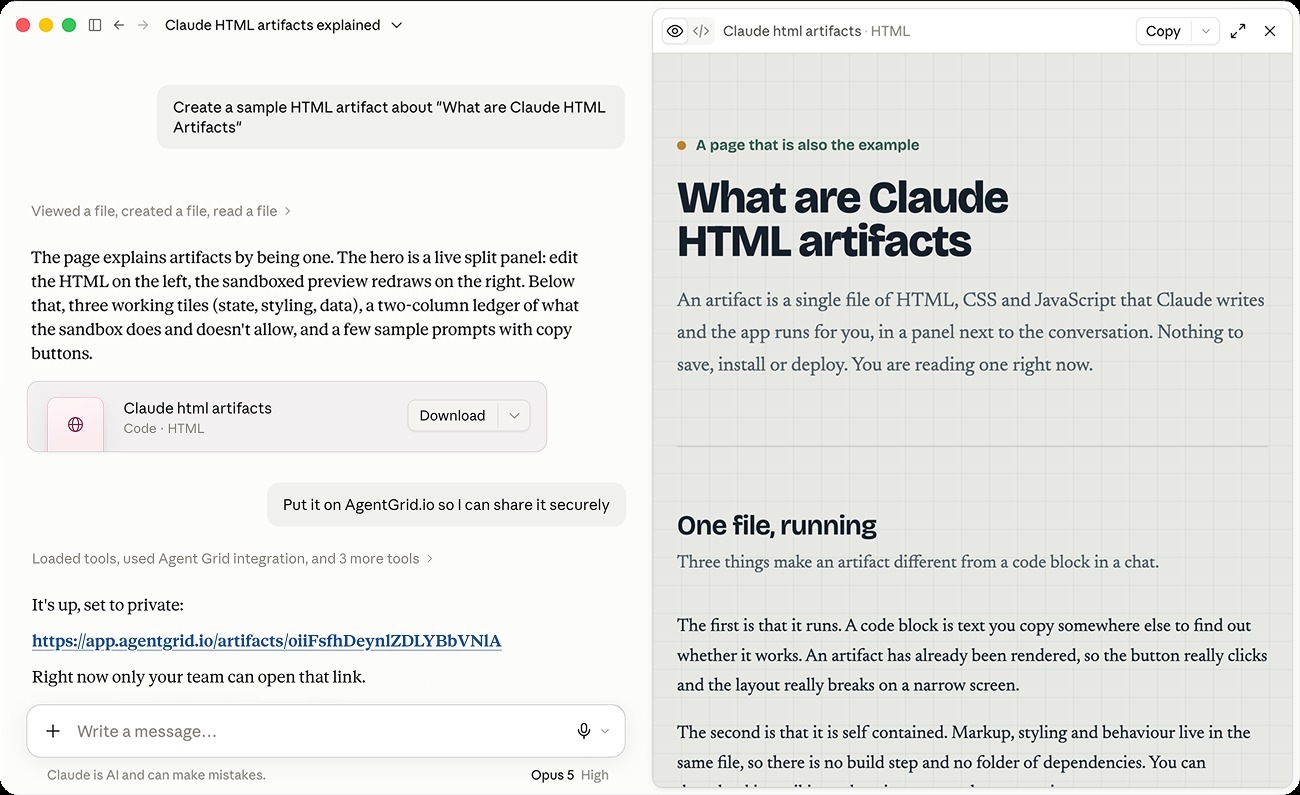
What is a Claude HTML artifact?
A Claude HTML artifact is a webpage or interactive experience rendered from HTML, CSS, and JavaScript inside Claude. It can be a landing page, dashboard, calculator, form, prototype, quiz, report, or small browser-based tool.
HTML artifacts are useful because you can see the result while you build it. Ask Claude to adjust the layout, rewrite a section, add an interaction, fix an error, or make the page responsive. The current output remains visible beside the conversation.
The first generated page is rarely the final version. The real value is the loop: prompt, preview, test, improve, and decide how the result should be shared.
How do you share or publish a Claude artifact?
Short answer: open the artifact, confirm that you are viewing the correct version, and use Claude’s Publish control when you want a native public link. Use organization sharing on supported Team or Enterprise plans when access should stay inside the organization. If you need a shared project that people and multiple agents can keep editing, publish the HTML artifact through AgentGrid.io.
Anthropic distinguishes between publishing and sharing artifacts:
- Publishing makes an artifact publicly available to anyone with its link on supported personal plans.
- Sharing makes an artifact available inside the relevant Team or Enterprise organization.
- AgentGrid.io publishing gives the work a stable artifact address, attributed history, and a continuation path for connected agents.
A public link is enough for a finished experiment. A living website needs more than access to one snapshot. It needs continuity.
How to publish a Claude HTML artifact with AgentGrid.io
1. Create and refine the HTML artifact in Claude
Describe the page or tool you want and ask Claude to create it as an artifact. Be specific about the audience, layout, content, interactions, and responsive behavior.
Preview the HTML artifact and request focused changes. Test buttons, forms, navigation, mobile layouts, and any sample data before you move it into a shared workspace.
2. Check the version and remove private information
Confirm that the open artifact is the version you intend to share. Remove secrets, personal information, private files, internal instructions, and realistic customer data.
Treat any public artifact like a public webpage. Review the visible page and its underlying code before publishing.
3. Connect Claude to AgentGrid.io
Install AgentGrid.io’s Claude connector. The connector gives Claude a path to create or update an AgentGrid.io artifact instead of leaving the result inside one conversation.
If you are starting from Claude Design rather than a standard Claude artifact, follow Anima’s related guide to publish a Claude Design website with AgentGrid.io.
4. Ask Claude to publish the HTML artifact
Use a clear instruction that names the current artifact, the required output, and what Claude should return:
Claude creates or updates the AgentGrid.io artifact and returns its address. Open it and check the rendered page before inviting collaborators or publishing it to a wider audience.
5. Share the right link with the right audience
Use the team artifact link for collaborators who need to review or continue the work. Keep client projects and restricted work in the appropriate team because team membership defines who can access team artifacts.
When the HTML page is approved for the open web, publish the selected version through the connected workflow. Public deployment is a separate action, so it should happen only when someone explicitly requests it.
6. Keep editing without passing copies between chats
Invite another person or compatible agent when the project needs different skills. Claude, Claude Code, Codex, Cursor, ChatGPT, Hermes, Rocket, and other connected agents can work from the same AgentGrid.io artifact when they have the right access and capabilities.
Each saved change becomes part of the artifact’s history. Review what changed, compare versions, and restore an earlier result when an edit goes wrong.
Claude publishing vs. AgentGrid.io for HTML artifacts
| Need | Claude artifact | AgentGrid.io artifact |
|---|---|---|
| Create an HTML page through conversation | Strong fit | A connected agent can create or update it |
| Preview and refine in the original Claude chat | Strong fit | Claude can continue after connecting |
| Share the current result | Native publish or organization sharing, depending on plan | Stable team artifact link, with public publishing as a separate action |
| Continue with another AI agent | Usually tied to the original Claude workflow | Connected agents can continue the same artifact |
| Track and restore versions | Artifact versions remain connected to Claude’s workflow | Git-backed, attributed, restorable history |
| Maintain an evolving website | Good for creation and focused iteration | Better for shared ownership and ongoing work |
Claude is the strong starting point for creating and refining an artifact through conversation. AgentGrid.io becomes useful when the output turns into team work and needs a life beyond one chat.
Why use AgentGrid.io to publish an HTML artifact?
A durable address for the project
A copied HTML file or temporary link gives someone a result. It does not necessarily give them the source, context, ownership, or next step. An AgentGrid.io artifact keeps the working project at one stable address.
Version history you can review and restore
AI agents move quickly, which makes rollback important. AgentGrid.io records saved versions with attribution, so teams can see who changed what and recover a previous version when needed.
A shared handoff between people and agents
The project does not have to restart when another person or agent joins. Give the right collaborator access to the same artifact, then continue from the current version instead of copying code across disconnected chats.
A path from HTML prototype to evolving website
A Claude HTML artifact may begin as a static prototype. A connected agent can keep building from the same project, including integrations, analytics, authentication, data, or deployment work when those capabilities are required.
Claude artifact publishing checklist
- Open the correct artifact and version.
- Test the HTML page on desktop and mobile.
- Check links, buttons, forms, and interactive states.
- Remove secrets, personal data, private files, and internal instructions.
- Decide whether access should be public, organization-only, or team-only.
- Use AgentGrid.io when people or other agents need to continue the project.
- Review the published result at the final URL.
- Keep a restorable version before major edits.
Frequently asked questions about Claude artifacts
Can Claude create an HTML artifact?
Yes. Claude can create a single-page HTML website or interactive browser experience as an artifact. You can preview it, inspect the underlying code, copy it, and ask Claude to make focused changes.
How do I get a public link for a Claude artifact?
On supported personal plans, open the correct artifact version, select Publish, and copy the public link. Anyone with that link can view and interact with the published artifact. If you need shared history and agent handoff, publish it through AgentGrid.io instead.
What is the difference between sharing and publishing a Claude artifact?
Publishing makes an artifact public to anyone with the link on supported personal plans. Sharing on Team and Enterprise makes it available only inside the relevant organization. These access models are different, so confirm the intended audience before using either one.
Can another AI agent edit my Claude artifact?
Not simply from a public viewing link. Move or create the work as an AgentGrid.io artifact, then give a compatible connected agent access to the same project. The next agent can continue from the current source and history instead of recreating it from screenshots or copied messages.
Can I update an HTML artifact after publishing it?
You can continue refining the work in Claude or through a connected AgentGrid.io workflow. Check the publishing rules for the surface you use, and review the selected version before replacing a public result.
Is a Claude HTML artifact a full production website?
Not automatically. It can be a strong interactive prototype or single-page experience, but production needs depend on the project. A real product may also require a backend, database, authentication, analytics, security review, monitoring, and a deployment setup.
Turn a Claude artifact into work your team can keep building
Creating the HTML is only the first step. The bigger question is whether the artifact can be found, reviewed, improved, and handed to the next person or agent without losing the work.
Use Claude for the fast creation loop. Use AgentGrid.io when the artifact needs durable history, shared ownership, multiple agents, and a clear path to publishing.