
 Figma
 API
 Web to code extension
 Adobe XD
 Discord
 Twitter
 GitHub


 Blog

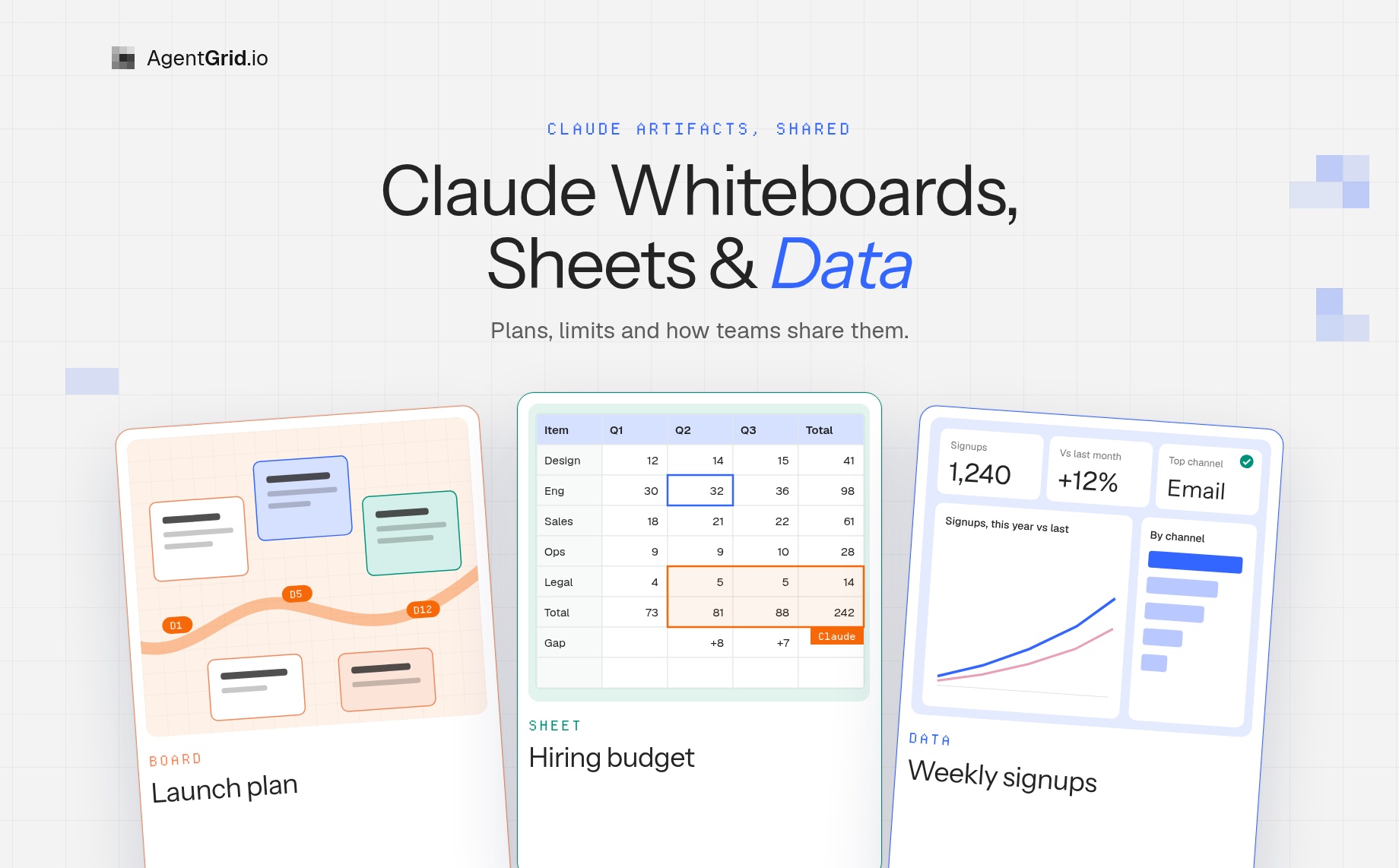
Claude Whiteboards, Sheets and Data: What Shipped, Plans, Limits and Sharing20 min read
Reading Time: 12 minutesA planning meeting ends, and the useful part is stuck in a chat with Claude. The timeline is a pasted list, the budget is a table inside a message, and the metrics are a screenshot nobody will refresh. Getting that into a board, a spreadsheet or a dashboard your team can open is the chore nobody enjoys.
That is the gap Anthropic went after on November 10, 2026. It launched Claude Whiteboards and Claude Sheets in beta and made Claude Data (formerly Claude Dashboards) generally available, all inside Claude and all on paid plans. Whiteboards is a shared board you and Claude draw on, Sheets is a spreadsheet that Claude and your teammates edit in the same cells, and Data builds dashboards and data stories from your company’s data. This guide covers what each one does, who gets it, what is still missing and how sharing works.
AgentGrid.io is where that work can go next. It is a shared workspace where people and AI agents create, review and keep editing the same files, so the sheet, the board export or the plan Claude wrote stops living as an attachment. In plain terms, it gives you:
- One link to share. Each app, document or stored file is an artifact with its own address, so the next person opens the current version instead of a forwarded copy.
- Comments and review in place. Select a passage or an element, leave a comment, mention a teammate or an agent, and resolve the thread when it is done.
- Version history. Every saved change shows its author, whether a person or an agent. You can compare versions and restore an earlier one.
- Any agent, with its own identity. Claude and ChatGPT connect through an official connector, coding agents such as Claude Code, Codex and Cursor connect with one CLI command, and agents can also work through MCP. Each one gets scoped, revocable permissions, and its edits are attributed to it.
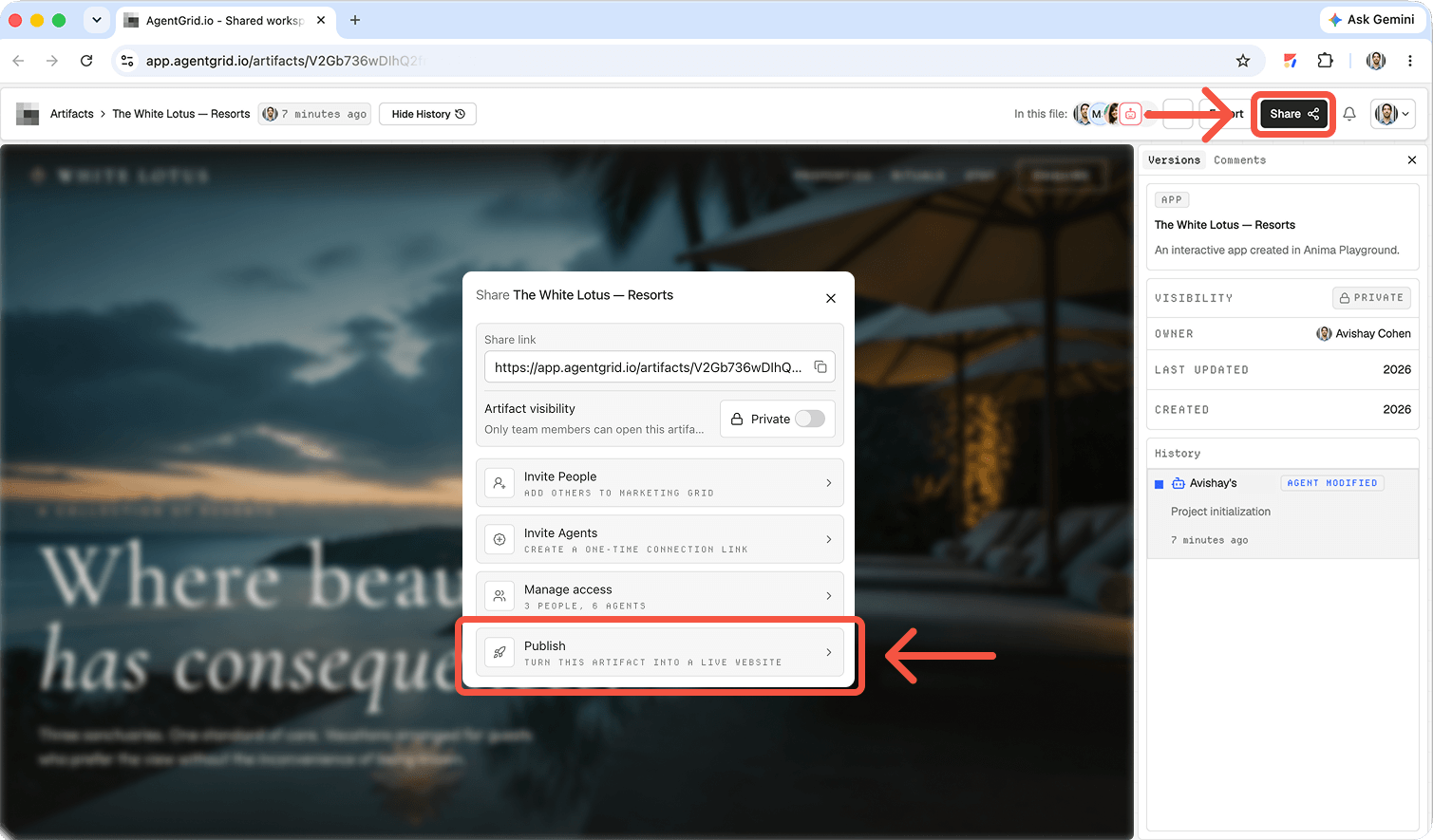
- People outside your team. Invite them into the workspace for private review, or publish to a public URL when you want anyone to open it. Sharing and publishing are separate steps.
For the work in this guide, that is a pattern and not a built-in Claude integration: export or write up what Claude made, keep it as one artifact, review it there and hand it to the next person or agent. Neither product documents a direct integration with the other as of November 2026.
What did Anthropic launch on November 10, 2026?
The launch post and the Help Center describe four things. Claude Whiteboards and Claude Sheets are new artifact types, both in beta. Claude Data is the renamed Claude Dashboards, now generally available, with certified queries and live sharing still in beta. Interactive connectors are a fourth, smaller change: they let you open the full version of a tool such as Adobe, Atlassian, Box or Notion beside your conversation, on web and desktop, and either work in it yourself or ask Claude to make changes with you.
Rollout is gradual. Claude said the updates are starting to roll out that day, so you may not see all of them right away. Anthropic also lists them next to Docs, Slides, Design (Claude Design) and Motion in the Artifacts tab, which is where everything you create is saved. If you want the background on how Claude artifacts are shared and published, start with our guide to Claude Artifacts and the one on Claude Docs.
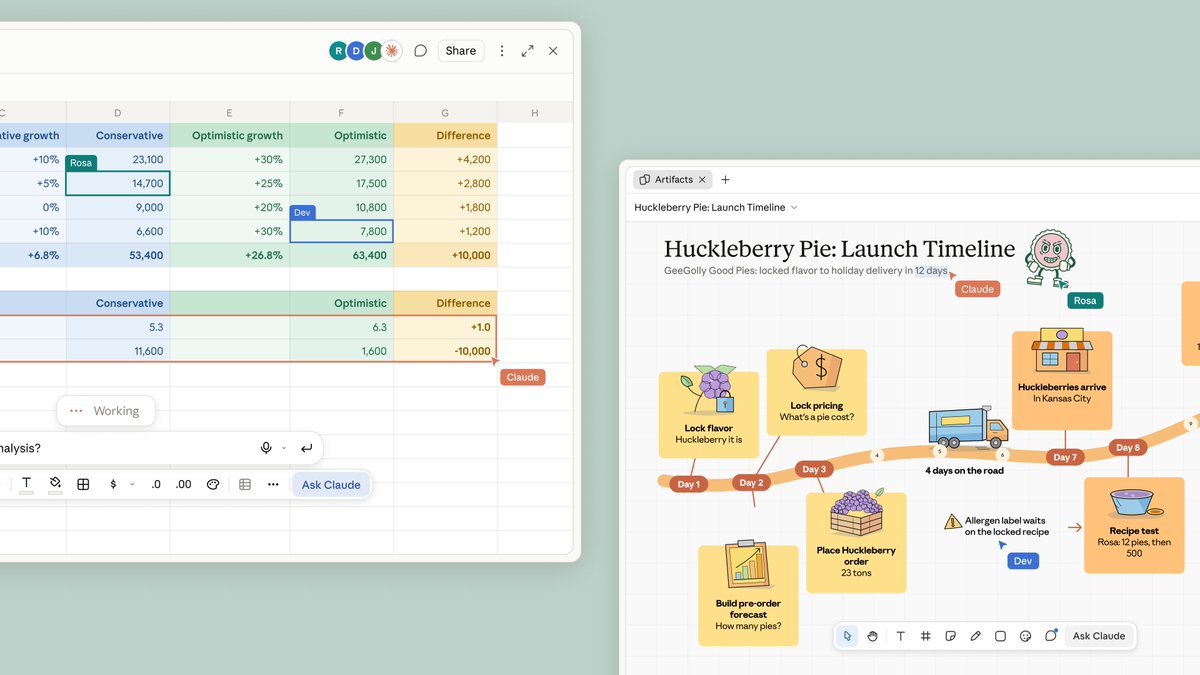
Starting to roll out today: Claude Whiteboards, Claude Sheets and Claude Data.
Think a plan through on a board, build a tracker in a sheet, and tell a story with your data. pic.twitter.com/S8M32FMrce
– Claude (@claudeai) November 10, 2026
Claude Whiteboards: a shared board Claude draws on while you talk
A whiteboard is an artifact that you, your team and Claude work on together. You can start one from any chat (“Start a whiteboard to plan our product launch”) or from the Artifacts tab, and you can talk, type or sketch. Dictate a messy plan and, per the Help Center, Claude groups related ideas, puts steps in order and connects the ones that depend on each other, using shapes, arrows and sections. Anyone on the board can move things around.
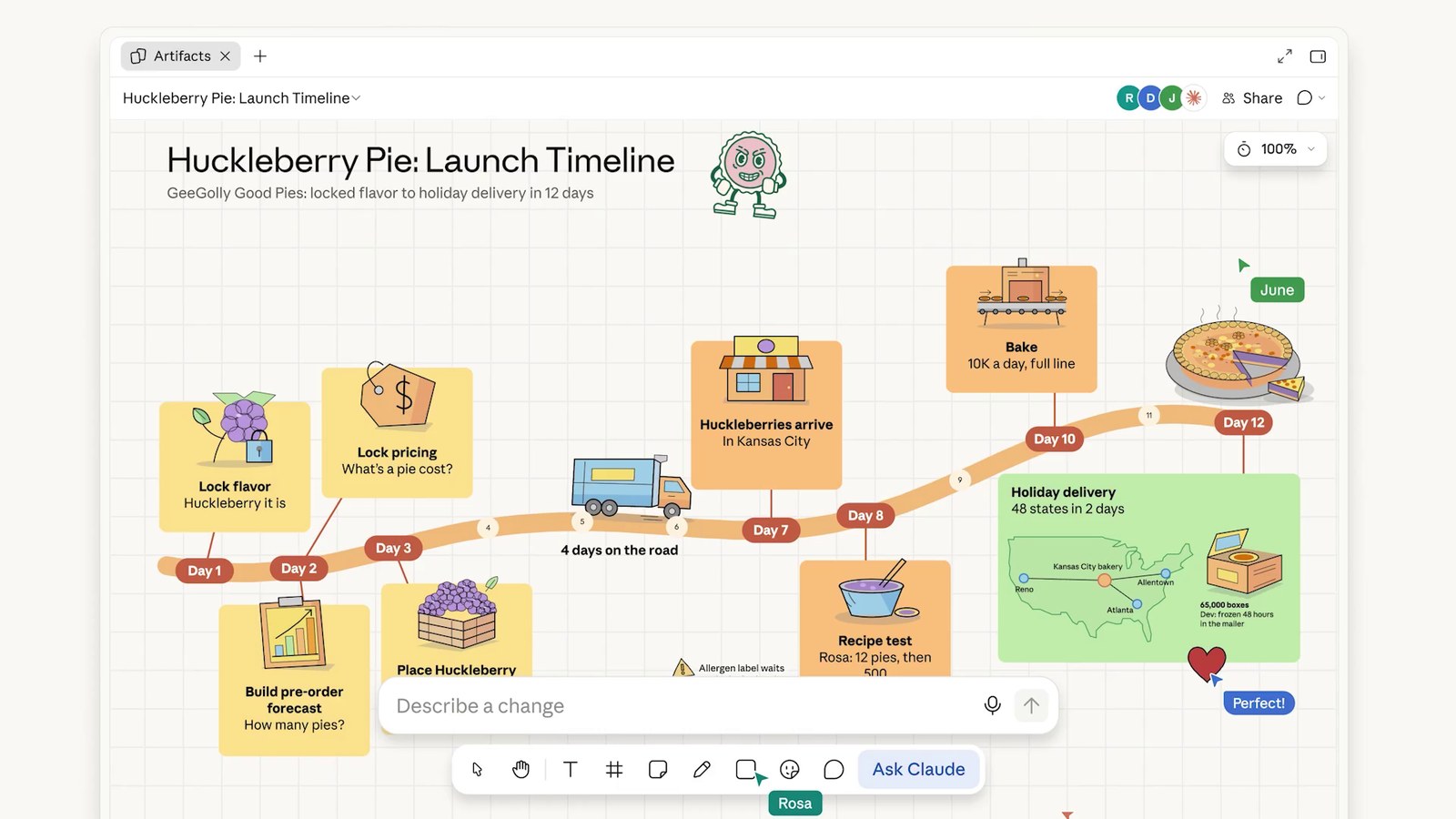
Three details make it more than a sticky-note pad. You can drag a box around one region and ask Claude about only that part. You can ask what is missing between two steps, and Claude adds its suggestions to the board for you to check. And in a retro, Anthropic says everyone can add notes while Claude groups them by theme and drafts action items for each person.
When the thinking is done, ask Claude to turn the board into a doc or a deck. To keep going elsewhere, Send to works with Lucid, Miro and Vani by Zoho (Zoho Vani), with more promised. You can also export a board as a PNG. You can add pictures and videos to a board, but you cannot import a board from a file.
Beta limits are worth reading before you plan a workshop around it. Claude works from what is on the board and does not use context from your connected apps. Whiteboards is not available to organizations with HIPAA-ready configurations or to Claude for Teachers yet. It counts toward your plan’s usage limits like the rest of your work with Claude.
With Claude Whiteboards, talk through a messy plan and Claude lays it out on a board your team can edit. With Claude Sheets, ask for a tracker or a budget and you get a working spreadsheet you can all keep building.
In beta on paid plans. pic.twitter.com/9gKDcMUspB
– Claude (@claudeai) November 10, 2026
Claude Sheets: a spreadsheet Claude edits cell by cell
Claude Sheets is a spreadsheet built into Claude. Ask for a campaign tracker, a hiring budget by team and quarter, or a forecast from a list of deals, and Claude builds a working sheet with tabs, formulas that work across tabs, formatting, conditional formatting, dropdowns, checkboxes and charts. The Help Center says formulas stay in the cells so you can check how each number was calculated, and that Claude Sheets includes 144 functions.
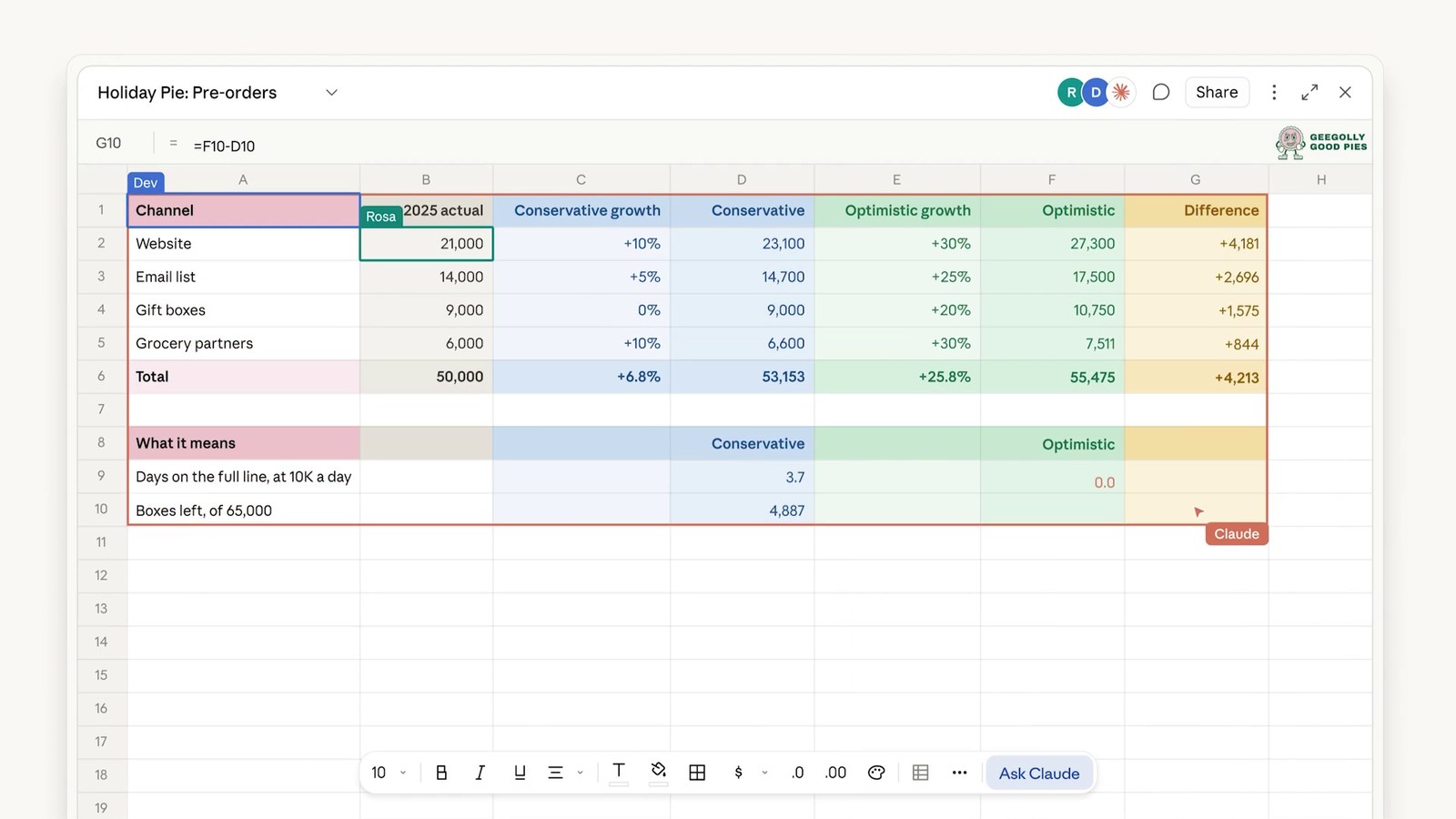
The collaboration model is the point. Claude edits in the same cells as you and outlines each change as it lands, so you can see what moved. When other people are in the sheet, you all work in the same cells at the same time. Version history shows earlier versions and can restore one, which also removes the edits made after it. Sheets start private to you until you share them.
Anthropic is candid that this is a light spreadsheet for now. The Help Center lists what is and is not there at launch:
| Area | At launch (beta) |
|---|---|
| Size | Up to 100,000 cells in a sheet |
| Bring data in | Import a CSV, import from Google Sheets or Excel, paste from either, or start blank |
| Take data out | Export as .xlsx or CSV. PDF export is not available yet |
| Not available yet | Pivot tables, protected ranges, find and replace, multi-column sort, filter views, multi-select dropdowns |
| Excel features not supported | Macros, VBA, Power Query, DAX and print layout |
| Live data | Sheets cannot pull live data from connected apps, and docs, decks and dashboards cannot use a sheet as a data source |
| Devices | Web and desktop, with basic read-only access on mobile |
| Data controls | HIPAA, CMEK and ZDR are not supported yet |
Anthropic also separates Claude Sheets from Claude for Excel and Claude for Google Workspace. Sheets is for a light, shared sheet you build with Claude. When your file already lives in Excel or Google Sheets, or you need everything those apps offer, use the add-ins or export the sheet. For the heavier spreadsheet jobs, that boundary is the honest summary.
Claude Data: the dashboards product, renamed and out of beta
Claude Dashboards launched in beta in October 2026. Anthropic renamed it because companies use their data for more than dashboards. Claude Data lets you connect a data warehouse such as Amazon Redshift, BigQuery, ClickHouse, Databricks or Snowflake, or another app you have connected to Claude, such as Salesforce. You ask a question in plain language, and Claude writes a SQL query for each chart. Each chart shows its query and when its data was last refreshed. Dashboards you already made keep working.
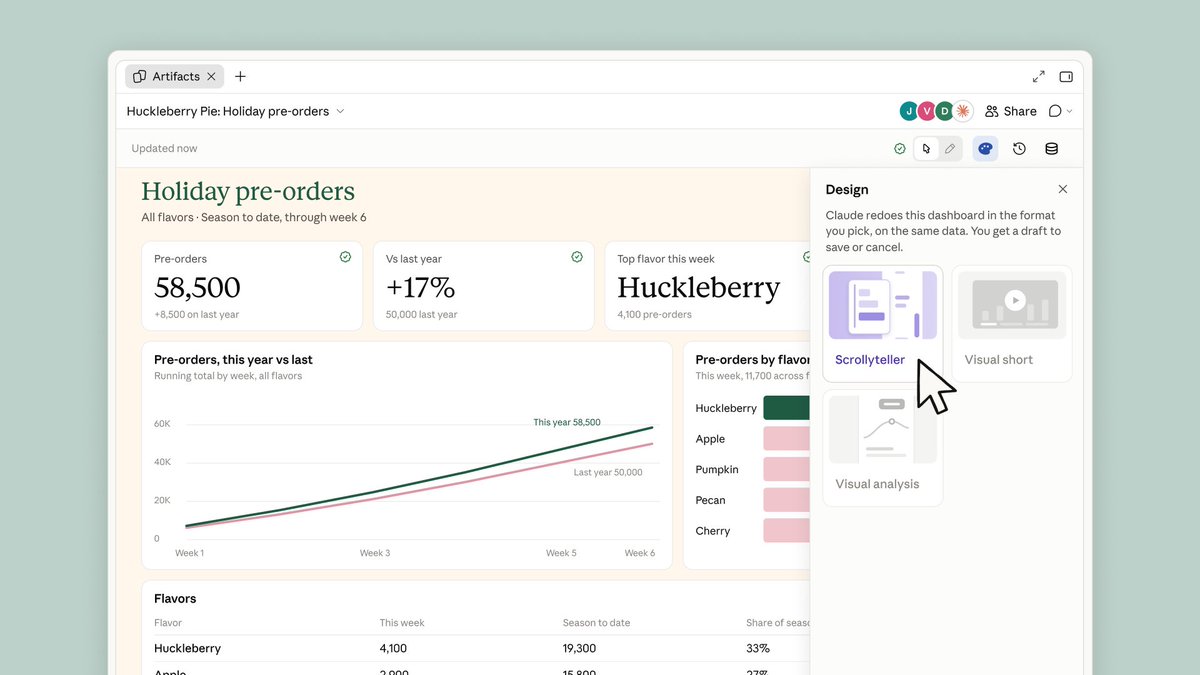
Beyond dashboards, Claude can draft scrolling data stories, short narrated videos and written summaries from your metrics, for you to review before sharing. Three features matter most for teams:
- Certified queries (beta). Your data team marks the queries everyone should use, and charts built on them carry a certified badge. Editing a certified query removes its certification.
- Live sharing (beta). Colleagues see current numbers even without access to the connectors behind them. Viewers see the results of the queries you approved and cannot run others with your access. Anthropic warns that it runs on your access, so check what a dashboard shows before you share it this way.
- Tracked changes. You can see who edited a dashboard and restore an earlier version. A restore appears as its own entry in version history.
Anthropic names Amplitude, Mixpanel, Omni, PostHog, Sigma and ThoughtSpot as Claude Data partners. Design systems, per-dashboard refresh settings and caching are also new.
Claude Data (formerly Dashboards) is now generally available on paid plans.
Along with dashboards, Claude can draft data stories and narrated videos from your metrics, for you to review before sharing. Certified queries and live sharing are in beta. pic.twitter.com/f5p3yZ2N9X
– Claude (@claudeai) November 10, 2026
Who gets Claude Whiteboards, Sheets and Data, and what admins control
The launch post says all three are available on all paid plans. The Help Center is more precise, and its availability notes list only paid plans. Here is the position as of November 15, 2026:
| Product | Stage | Plans | Where it works | Team plans | Enterprise plans |
|---|---|---|---|---|---|
| Claude Whiteboards | Beta | Pro, Max, Ultra, Team, Enterprise | Web, desktop, mobile | On by default | Off by default until turned on in Organization settings > Artifacts |
| Claude Sheets | Beta | Pro, Max, Ultra, Team, Enterprise | Web and desktop, basic read-only on mobile | On by default | Off by default until turned on in Organization settings > Artifacts |
| Claude Data | Generally available. Certified queries and live sharing in beta | Pro, Max, Ultra, Team, Enterprise | Web, desktop, mobile. Needs a data connector | On by default, with both beta features | Turns on by default on November 20, 2026 unless an owner saved a setting. Beta features off by default |
Owners manage these switches in Organization settings > Artifacts, and Enterprise owners can limit Sheets and Data to groups with custom roles. All three count toward your plan’s usage limits. If you are rolling this out to a company, that settings page, not the launch post, is the one to bookmark.
How sharing works for Claude artifacts
Everything starts private. Anthropic’s sharing guide says to open an artifact and click Share, then choose who can open it and what they can do. There are three access levels: Can view (open it and read comments), Commenter (also comment and download files the artifact offers) and Can edit (also make changes). On Team and Enterprise plans artifacts stay inside your organization by default, and an Owner decides whether people can share outside it. “Anyone with the link” is available only when an Owner has turned on external sharing or allowed that artifact individually.
You can also invite specific people by email, in beta on paid plans. The invitee needs a Claude account with that address, parts of the artifact that use Claude or your connectors do not work for them, pending invitations expire after 30 days, and sharing settings cannot be changed from the iOS or Android apps. A whiteboard follows the same rules: people outside your organization can join if you invite them by email and your admin has that setting on.
The practical reading is that Claude’s sharing is built around people who have Claude accounts. Anthropic documents editing by people with those accounts and by Claude itself. It does not document other agents editing the same board or sheet.
Claude Meetings puts whiteboards into the video call
Two days after the launch, Claude Meetings started rolling out in beta on Team and Enterprise plans. Claude joins a Google Meet call as a visible participant, writes notes and action items, answers questions, and builds docs and whiteboards while the team talks. Anthropic says support for other video platforms is coming. By default Claude stays out of calls with outside guests unless an admin allows it, and the docs, whiteboards and other artifacts it makes in a call are free through February 10, 2027.
Introducing Claude Meetings: add Claude to your team’s video call and it builds docs, whiteboards, and other artifacts with you while you’re still talking.
Starting to roll out in beta on Team and Enterprise plans. pic.twitter.com/qlZYTcXBsC
– Claude (@claudeai) November 12, 2026
Where a Claude board or sheet ends and a cross-agent workspace starts
Claude’s artifacts solve the first handoff, from one person’s chat to a teammate in the same Claude organization. They do not claim to solve the next one. A sheet or board lives in Claude. The finance lead who wants to review it in another tool, the contractor without a Claude seat, or the agent that is not Claude each need a copy, and a copy is where the version trouble starts.
This is where I would use AgentGrid.io. Every app, document or stored file there is an artifact with its own link and version history, and you can upload a file, folder or ZIP. Connected agents have their own revocable identity, and changes by people and agents stay attributed in history. In practice the pattern looks like this:
- Finish the work in Claude: the board, the sheet or the data story.
- Take out the part that has to travel. Export a sheet as .xlsx or CSV, save a board as a PNG, or ask Claude to turn the board into a plan written as a document.
- Keep that result as one artifact in a shared workspace, so the next person or agent opens the current version instead of a forwarded attachment.
- Review it there, restore an earlier version if an edit goes wrong, and publish only when you deliberately want a public URL.
That is a workflow, not a built-in feature. AgentGrid.io does not document opening a Claude Whiteboard or Claude Sheet natively, so what you export from Claude is a snapshot of the work at that moment. For a team that also uses ChatGPT or other agents, the snapshot is the part that can have a shared history. Our guides on moving context from ChatGPT to Claude and on sharing a file between Claude and ChatGPT cover the same handoff for other file types.
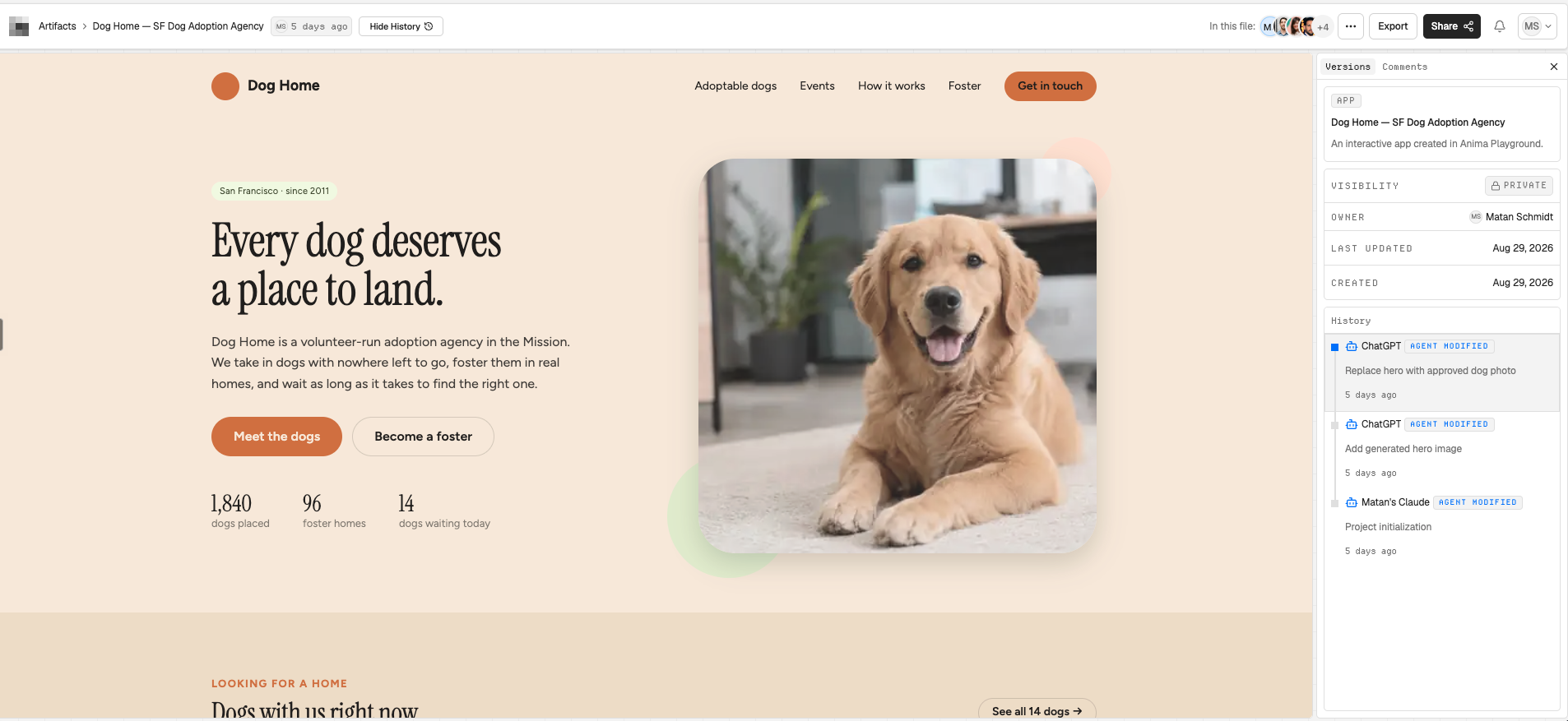
The version history shows who changed what, compares versions and restores an earlier one. Review comments let people leave feedback on the artifact itself. Sharing a link and publishing are separate steps.
Should your team move work into Claude Whiteboards, Sheets and Data?
My read is that these are good first drafts that stay editable, and an honest sign of where Claude is heading as a workplace tool. The decision is about where the work needs to go next.
- Use Claude Whiteboards, Sheets and Data when your team already works in Claude, the artifact is a plan, a tracker or a quick analysis, and everyone who needs it has a Claude account.
- Keep Excel or Google Sheets when you need pivot tables, macros, Power Query or print layout, or when the file already lives there. Anthropic points to Claude for Excel and Claude for Google Workspace for that.
- Send a board to Lucid, Miro or Vani by Zoho (Zoho Vani) when the diagram needs more than Claude’s board offers.
- Use a shared workspace such as AgentGrid.io when the result has to be reviewed, versioned or continued by people and agents outside one Claude organization.
Frequently asked questions
What are Claude Whiteboards?
Claude Whiteboards is a shared board where you, your team and Claude think through ideas. You talk, type or sketch, and Claude lays the ideas out as diagrams, flows and groups. It launched in beta on November 10, 2026 for Pro, Max, Ultra, Team and Enterprise plans, and Claude can turn a finished board into a doc or deck.
What is Claude Sheets?
Claude Sheets is a spreadsheet inside Claude that Claude and your teammates edit in the same cells. It supports tabs, formulas across tabs, formatting, dropdowns and charts, and it is in beta. Anthropic says it covers common spreadsheet work, with pivot tables and several other features not available yet.
Is Claude Data the same as Claude Dashboards?
Yes. Claude Dashboards launched in beta in October 2026 and became generally available as Claude Data on November 10, 2026. Existing dashboards keep working. Claude Data also drafts data stories and narrated videos, and certified queries and live sharing are in beta.
Are Claude Whiteboards, Sheets and Data free?
They are for paid plans. The Help Center lists Pro, Max, Ultra, Team and Enterprise. Using them counts toward your plan’s usage limits. Claude Meetings is a separate beta for Team and Enterprise, and the artifacts Claude makes in a call are free through February 10, 2027.
Can I export Claude Sheets to Excel?
Yes. You can export a sheet as .xlsx or CSV, and you can import a CSV or bring data in from Excel or Google Sheets. PDF export is not available yet, and Excel features such as macros, VBA, Power Query, DAX and print layout are not supported.
Can people outside my company use a Claude Whiteboard?
They can join if you invite them by email, they have a Claude account with that address, and your admin has email invitations outside the organization turned on. On Team and Enterprise plans artifacts stay inside the organization by default, and parts that use Claude or your connectors do not work for outside guests.
Where do admins turn these on or off?
In Organization settings > Artifacts. On Team plans all three are on by default. On Enterprise plans Whiteboards and Sheets are off by default, and Claude Data turns on by default on November 20, 2026 unless an owner has already saved a setting.
Can I use AgentGrid.io with Claude Whiteboards and Sheets?
Neither product documents a direct integration as of November 2026. A simple pattern is to export a sheet or board, or ask Claude to write the plan as a document, then keep that result in AgentGrid.io so people and agents can review it and keep a version history.