 Figma
Figma API
API Web to code extension
 Adobe XD
 Discord
 Twitter
 GitHub
'/%3E%3Cpath%20fill='%23b2b2b2'%20d='M241%20382q0%2016%2017%2026%2017%2011%2042%2011t42-11q16-11%2017-26V269H241'/%3E%3Cpath%20fill='%239f7e00'%20d='M241%20379q0%2014%208%2023%209%209%2021%209%2014%200%2021-9%209-9%209-23V269h-59'/%3E%3Cpath%20d='M241%20339v-70h59v110q0%2014-9%2023l-6%205v-68h-15v72q-8%200-14-4v-68zm59%2040c0%2022%2015%2032%2029%2032%2021%200%2030-18%2030-32v-40h-59'/%3E%3Cpath%20fill='%239f7e00'%20d='M266%20277v5h2v12h-3v-5h2v-5h-9v5h2v5h-4v9h3v18h-5v10h34v-10h-5v-18h3v-9h-4v-5h2v-5h-9v5h2v5h-3v-12h2v-5zm42%20101q0%2010%206%2017%206%206%2015%207%2010-1%2016-7%206-7%206-17v-29h-43'/%3E%3Ccircle%20fill='%230044ad'%20cx='329.5'%20cy='372'%20r='6'/%3E%3Cellipse%20fill='%230044ad'%20cx='300'%20cy='340'%20rx='16'%20ry='21'/%3E%3C/svg%3E)


'%3E%3Cpath%20stroke='%23000'%20stroke-width='4'%20d='m-35-37-13%2020m5%203%2013-20m5%203-13%2020m63%2042%206-9m1-2%206-9m5%203-6%209m-1%202-6%209m5%203%206-9m1-2%206-9m-96%200%2013%2020m5-3-6-9m-1-2-6-9m5-3%2013%2020m63-42-6-9m-1-2-6-9m5-3%2013%2020m5-3-6-9m-1-2-6-9'/%3E%3Ccircle%20r='24'%20fill='%23cd2e3a'/%3E%3Cpath%20fill='%230047a0'%20d='M0%200a12%2012%200%201%201%2020%2013%2024%2024%200%201%201-40-26A12%2012%200%201%200%200%200'/%3E%3C/g%3E%3C/svg%3E)


'%3E%3Ccircle%20r='92'/%3E%3Ccircle%20fill='%23fff'%20r='80'/%3E%3Ccircle%20r='16'/%3E%3Cg%20id='c'%3E%3Cg%20id='b'%3E%3Cpath%20id='a'%20d='m0-80%203%2048L0-8-3-32M21-77%2011-30%202-8%205-32M40-69%2019-26%204-7%2013-29'/%3E%3Cuse%20href='%23a'%20transform='scale(-1)'/%3E%3C/g%3E%3Cuse%20href='%23b'%20transform='rotate(45)'/%3E%3C/g%3E%3Cuse%20href='%23c'%20transform='rotate(90)'/%3E%3C/g%3E%3C/svg%3E)


'/%3E%3C/svg%3E)


'/%3E%3C/svg%3E)
'/%3E%3C/g%3E%3Cuse%20href='%23b'%20transform='rotate(45%20140%20300)'/%3E%3Cpath%20d='m299%20285%2046%2015-46%2015%2028-39v48M59%20510l-36%2032%2010-47%2020%2043-42-24m22-409L23%2058l36%2032-48-4%2042-24'/%3E%3C/svg%3E)


'/%3E%3C/svg%3E)
 Blog
Blog
Claude Duet: What It Is, How to Use It, and What It Can Do11 min read
Reading Time: 7 minutesClaude Duet is Anthropic’s proactive AI agent for delegated work. Instead of waiting for a new chat prompt, it can brief you on what needs attention, work through tasks in connected apps, and ask for approval before consequential actions. Anthropic opened a US research-preview waitlist on October 21, 2026, for Claude Pro and Max subscribers. Duet is not generally available yet.
If you want to know what Claude Duet can actually do, how to get access, and where its limits are, this guide covers the practical details. The most important distinction: Duet can prepare work while you are away, but you still own the decisions and should review the result.
Join the official Claude Duet waitlist if you are eligible. If you need a shared place for the documents, decks, or apps an agent creates, AgentGrid.io is a separate workspace for people and agents to continue working on the same artifact.
What is Claude Duet?
Claude Duet is a standalone Claude experience that you message by text or voice. It uses your Claude account’s memory, skills, and connected apps, then works on a cloud computer with its own browser. That means a task can continue after you close the app or put down your phone.
Anthropic describes it as a proactive agent: it can send a morning brief, check connected accounts at intervals, and message you when a task finishes or needs a decision. It is powered by Claude Opus 5.5. You cannot select another model in the research preview.
Duet is aimed first at professionals and small-business owners handling a stream of inbox, calendar, finance, and project work. It is not simply a new name for the regular Claude chat app. The difference is the ongoing delegation and follow-up.
What can Claude Duet do?
- Prioritize the day: scan connected email and calendar accounts to prepare a morning brief and draft replies for review.
- Handle administrative tasks: prepare meeting scheduling, find unpaid invoices, or draft reminders using connected services.
- Create substantial deliverables: research a company, assemble a brief, build a spreadsheet or financial model, produce a deck, or work on a dashboard or web app.
- Work across apps: use connected services or its cloud browser when a site has no connector. Anthropic says its marketplace contains more than 6,000 connectors and plugins; that is a marketplace count, not a promise that every action in every service works in Duet.
- Pause for approval: show you a proposed message, payment, document signature, or deletion before taking that action.
For a concrete task, you might say: “Check my calendar and inbox for tomorrow’s client meeting. Prepare a one-page brief with the latest decisions and a draft follow-up email. Do not send anything until I review it.” The brief and draft are the deliverables; the final send remains your call. This is an example request, not a test of a live Duet account.
How does Claude Duet work?
Duet starts with the memory, skills, and apps in your existing Claude account. You can message it in one ongoing thread and track assigned work in the Tasks tab. Larger files appear in the Make tab for review and editing. Its cloud computer does the work in the background, so your own device need not remain on.
It does not watch your accounts continuously. Anthropic says Duet checks them at intervals, and those checks consume plan usage. It may miss something urgent between checks or misjudge what matters. Treat its brief as a helpful filter, not a guaranteed alert system.
The approval boundary matters. Duet can read, draft, and prepare a task, but Anthropic says it waits for confirmation before sending messages, paying, signing, or deleting. Some actions, including securities trading and transfers between accounts, remain off-limits even with approval.
How to join the Claude Duet waitlist
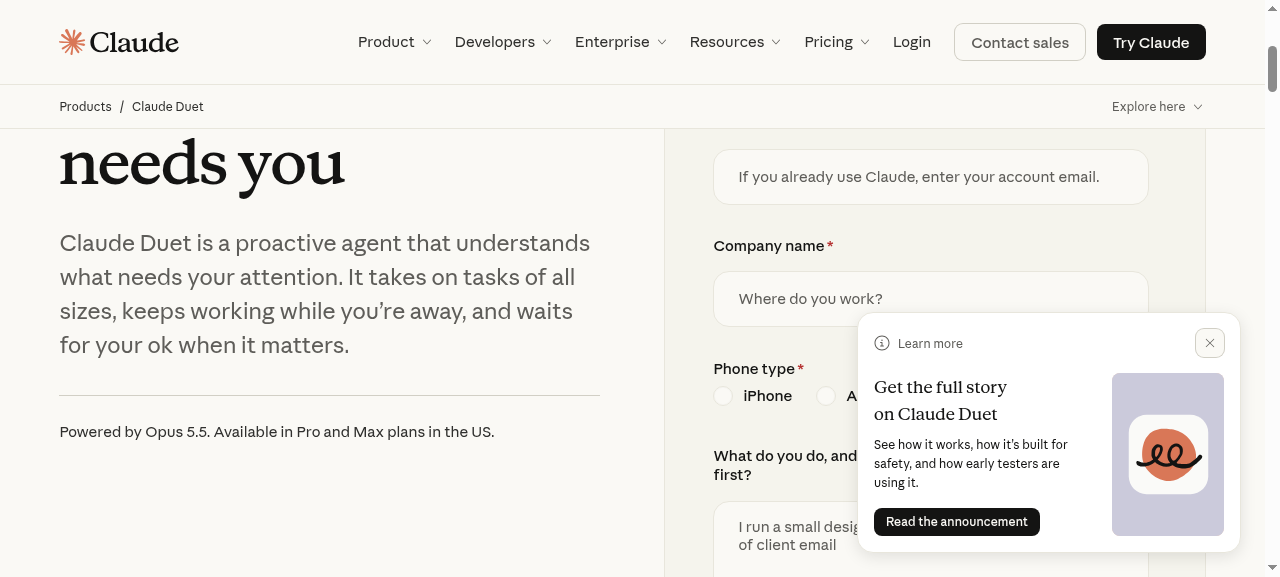
- Open Anthropic’s Claude Duet page and select Join the waitlist.
- Use the email address tied to your US Claude Pro or Max account and complete the requested details, including your phone type.
- Wait for an invitation. Anthropic is admitting people in waves and does not promise an access date.
- When invited, follow the setup instructions for iPhone or Android and sign in with the same Claude account. Duet is also available on the web at claude.ai for invited users.
- Review connected-app access, start with a low-risk task, and check the proposed output or approval request before any important action.
There is no additional Duet charge during this preview for eligible Pro and Max subscribers, but background checks and longer jobs share your normal Claude usage limits. Free, Team, and Enterprise plans are not included in the initial preview.
Claude Duet vs. Claude chat: what changes?
| Question | Claude chat | Claude Duet |
|---|---|---|
| Who starts? | You open a conversation and ask. | You can assign work, and Duet can brief or update you proactively. |
| Where does work run? | In the Claude experience you are using. | On Duet’s cloud computer, including while you are away. |
| What carries over? | Your Claude account context. | Claude memory, skills, and connected apps carry into Duet. |
| How are actions controlled? | Depends on the Claude feature and tool. | Duet requests approval for sensitive actions such as sends, payments, signatures, and deletions. |
| Who can get it now? | Depends on the Claude plan and feature. | Invited US Pro and Max users during the research preview. |
Think of chat as a place to work alongside Claude. Duet is an attempt to hand off work and return to it when the agent has a result or needs you. Its proactive behavior is useful, but it also consumes usage and requires careful review.
Where Claude Duet’s work goes next
An agent can prepare a report, deck, or app, but a team still needs to decide where the approved version lives. When a deliverable needs another editor or another agent, don’t assume that sharing a Claude chat provides a common working file or complete cross-agent context.
A useful handoff is to keep approved project context in a shared workspace. AgentGrid.io provides a Claude connector, while Anthropic says Duet carries connected apps from your Claude account. The connector workflow appears at the end of this guide; if it is unavailable in your Duet preview account, you can still review a deliverable and move the file into the workspace yourself. Confirm the artifact and permissions before inviting collaborators.
If you are comparing the broader agent category, see our Muse AI guide. For document-specific features and alternatives, read the Claude Docs review.
Claude Duet limitations and safety considerations
- Early access: a US-only waitlist for Pro and Max, with invitations in waves.
- Imperfect judgment: Duet may misread a thread, over- or under-prioritize a message, or miss an item between scheduled checks.
- Limited visibility: you cannot currently watch or take over its browser. Review completed work and approvals carefully.
- Not every integration is equal: some Slack actions are limited, and Microsoft 365 is not yet available in Duet. A marketplace listing alone does not verify a full Duet workflow.
- Usage is shared: background work counts toward the same plan limits as other Claude use.
- Scope is bounded: it cannot see local computer files or all Claude projects, call or text other people, or move money between accounts.
Because Duet reads outside material such as email and web pages, a malicious instruction embedded in that material remains a risk. Anthropic describes safeguards against prompt injection, but says no defense is perfect. Approve sensitive actions only after checking the recipient, amount, attachments, and underlying source.
Bottom line: Claude Duet is promising for work that benefits from a persistent assistant and periodic check-ins. Start with tasks you can verify, keep approvals in human hands, and give important outputs a clear home when other people or agents need to build on them.
Continue Claude Duet work with AgentGrid
Duet already provides a Tasks tab and a Make tab for finished work, as described in Anthropic’s Duet help guide. Use AgentGrid.io when people and other agents need to continue a project together.
For example, Duet might prepare customer research, ChatGPT might develop messaging, and a coding agent might build a prototype. AgentGrid holds shared documents and apps that authorized people and connected agents can read and update, with contributions recorded in version history. Learn how shared context works.
The habit is simple: preserve useful project context, then ask the next agent to read the current artifact before starting. This does not automatically synchronize Duet’s private conversation history or internal memory.
1. Connect AgentGrid to Claude Duet
AgentGrid has a Claude connector in Claude’s directory. Install it and sign in to AgentGrid to authorize the workspace you want to use. Anthropic says Duet carries connected apps from your Claude account, so invited Duet users can check whether that authorized connection is available in their Duet preview. We have not tested an end-to-end connection in an invited Duet account.
Install the AgentGrid connector for Claude →
2. Ask Duet to save and update your work
Once Duet can access the authorized workspace, ask it to save reviewed research, notes, decisions, and action items:
As the project develops, ask Duet to update the same document:
Choose a workspace whose members should have access to this work. Saving a document there makes it available to authorized teammates and connected agents; public publishing is a separate action. Check that the requested changes were saved.
3. Give the next agent a concrete assignment
Connect and authorize the next assistant, then give it the current artifact link and a specific task:
AgentGrid supports continuing work on shared artifacts with connected agents. What an agent can read or change depends on the permissions you grant. See the agent connection guide. The saved findings and decisions give the next task a useful starting point; they do not transfer Duet’s complete chat history.
Delegate to Claude Duet. Keep the project moving in AgentGrid.
Claude Duet FAQ
Is Claude Duet available now?
Anthropic opened a research-preview waitlist on October 21, 2026. Eligible US Pro and Max subscribers can request access, but joining does not mean immediate admission.
Is Claude Duet free?
It is included in eligible Pro and Max plans during the research preview at no extra charge. Its background activity and tasks use the plan’s existing limits.
Does Claude Duet have an iPhone or Android app?
Yes. Anthropic says it is a standalone app for iOS and Android, with web access at claude.ai for invited users.
Can Claude Duet send emails or make payments on its own?
It can prepare those actions, but Anthropic says it asks for your approval before sending a message or making a payment. Some financial actions are prohibited entirely.
Is Claude Duet the same as Claude Docs?
No. Claude Docs is a document-creation and editing experience. Duet is a proactive agent that can take on tasks across connected apps and return deliverables, which may include documents.
Can I connect Claude Duet directly to AgentGrid.io?
AgentGrid offers a connector in Claude’s directory, and Anthropic says Duet carries over connected apps from your Claude account. Install and authorize it, then confirm that your invited Duet account can access the intended workspace. Connector access and actions depend on your preview account and permissions.