 Figma
Figma API
API Web to code extension
 Adobe XD
 Discord
 Twitter
 GitHub
'/%3E%3Cpath%20fill='%23b2b2b2'%20d='M241%20382q0%2016%2017%2026%2017%2011%2042%2011t42-11q16-11%2017-26V269H241'/%3E%3Cpath%20fill='%239f7e00'%20d='M241%20379q0%2014%208%2023%209%209%2021%209%2014%200%2021-9%209-9%209-23V269h-59'/%3E%3Cpath%20d='M241%20339v-70h59v110q0%2014-9%2023l-6%205v-68h-15v72q-8%200-14-4v-68zm59%2040c0%2022%2015%2032%2029%2032%2021%200%2030-18%2030-32v-40h-59'/%3E%3Cpath%20fill='%239f7e00'%20d='M266%20277v5h2v12h-3v-5h2v-5h-9v5h2v5h-4v9h3v18h-5v10h34v-10h-5v-18h3v-9h-4v-5h2v-5h-9v5h2v5h-3v-12h2v-5zm42%20101q0%2010%206%2017%206%206%2015%207%2010-1%2016-7%206-7%206-17v-29h-43'/%3E%3Ccircle%20fill='%230044ad'%20cx='329.5'%20cy='372'%20r='6'/%3E%3Cellipse%20fill='%230044ad'%20cx='300'%20cy='340'%20rx='16'%20ry='21'/%3E%3C/svg%3E)


'%3E%3Cpath%20stroke='%23000'%20stroke-width='4'%20d='m-35-37-13%2020m5%203%2013-20m5%203-13%2020m63%2042%206-9m1-2%206-9m5%203-6%209m-1%202-6%209m5%203%206-9m1-2%206-9m-96%200%2013%2020m5-3-6-9m-1-2-6-9m5-3%2013%2020m63-42-6-9m-1-2-6-9m5-3%2013%2020m5-3-6-9m-1-2-6-9'/%3E%3Ccircle%20r='24'%20fill='%23cd2e3a'/%3E%3Cpath%20fill='%230047a0'%20d='M0%200a12%2012%200%201%201%2020%2013%2024%2024%200%201%201-40-26A12%2012%200%201%200%200%200'/%3E%3C/g%3E%3C/svg%3E)


'%3E%3Ccircle%20r='92'/%3E%3Ccircle%20fill='%23fff'%20r='80'/%3E%3Ccircle%20r='16'/%3E%3Cg%20id='c'%3E%3Cg%20id='b'%3E%3Cpath%20id='a'%20d='m0-80%203%2048L0-8-3-32M21-77%2011-30%202-8%205-32M40-69%2019-26%204-7%2013-29'/%3E%3Cuse%20href='%23a'%20transform='scale(-1)'/%3E%3C/g%3E%3Cuse%20href='%23b'%20transform='rotate(45)'/%3E%3C/g%3E%3Cuse%20href='%23c'%20transform='rotate(90)'/%3E%3C/g%3E%3C/svg%3E)


'/%3E%3C/svg%3E)


'/%3E%3C/svg%3E)
'/%3E%3C/g%3E%3Cuse%20href='%23b'%20transform='rotate(45%20140%20300)'/%3E%3Cpath%20d='m299%20285%2046%2015-46%2015%2028-39v48M59%20510l-36%2032%2010-47%2020%2043-42-24m22-409L23%2058l36%2032-48-4%2042-24'/%3E%3C/svg%3E)


'/%3E%3C/svg%3E)
 Blog
Blog
Notion Agents Rebuilt: What Changed, How It Works, and Its Limits10 min read
Reading Time: 7 minutesNotion rebuilt its agents on October 19, 2026. Notion Agent now has its own computer and web browser, can stay on one task for up to 24 hours instead of five minutes, and can run on your ChatGPT Plus, Pro or Go plan. For teams that already plan work in Notion, that turns the agent from a page editor into something closer to a researcher that files its own results.
This guide covers what changed, how to turn the new parts on, what they cost under Notion’s new credits, the limits Notion lists itself, and how to move the agent’s output into work that Claude, ChatGPT and Grok Bot also touch.
If you want a workspace built for agents from the start, AgentGrid.io is the agent-first Notion alternative, where your docs are shared by agents and humans alike.
What changed in Notion Agents?
Notion calls this the sixth generation of its agent harness. The changes that matter in daily use:
- Long-running tasks. Each session runs on a dedicated service with a queue-backed worker loop, so work survives restarts. Notion’s release notes say tasks can run for up to 24 hours. The previous limit was five minutes.
- Its own computer. The agent gets a private space where it can run code, work with files and build things. Notion’s reasoning is cost as much as capability: a short script is often faster and cheaper than working through the same data with model tokens.
- A web browser. With browsing on, the agent can open sites, click through pages, fill out and submit forms, download files and bring results back into Notion, including sites with no Notion connection.
- Smarter context management. Long conversations get compacted, and large tool results are offloaded instead of filling the context window.
- “Review for me” approvals. A separate model checks whether an action looks unsafe before the agent takes it. This is now the default.
- A new Auto model router and a new credit system, covered below.
How the agent’s computer and browser work
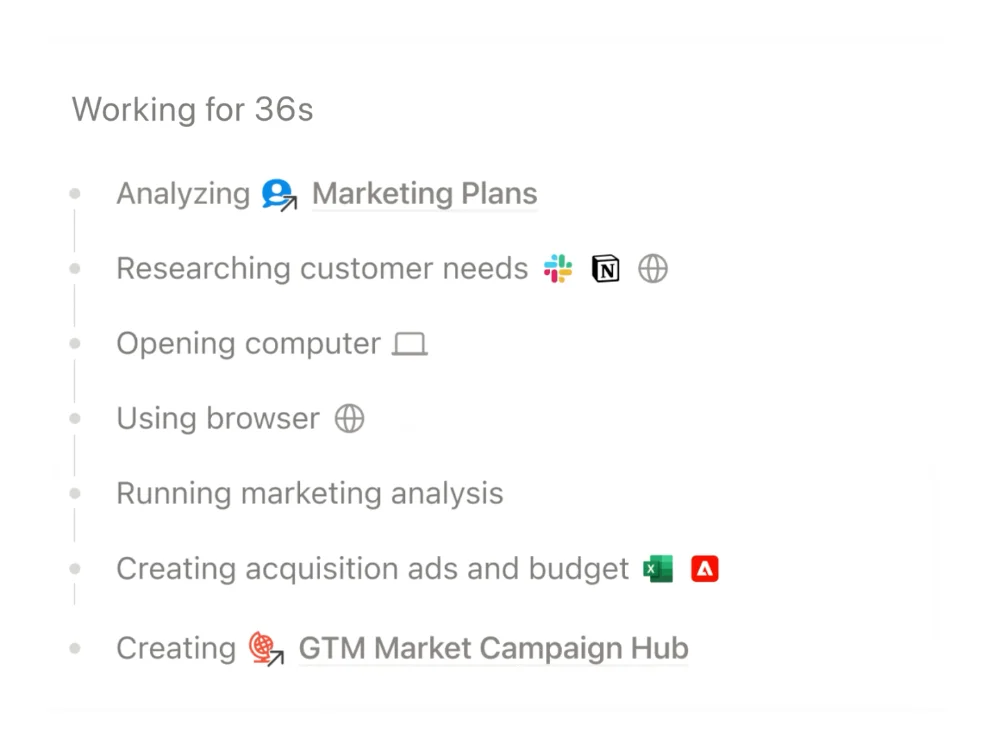
The split is worth understanding before you give the agent a big job. The built-in computer is closed off from the internet by default. It can still run code, create files, build charts and work with your Notion content. Web search lets it look things up and answer in chat. Only web browsing opens that computer to the internet so it can act on websites.
To turn browsing on:
- If you are on Enterprise or work with a Notion account manager, an owner or admin first goes to Settings → Notion AI and turns on Enable web browsing for computer.
- Each person then goes to Settings → Notion AI and turns on Web browsing for their own agent. On most other plans the workspace already allows it.
- Start a task and follow it in the live browser view. You can click or type to help, and when a site asks you to sign in, Notion shows a pop-up and the agent waits. Notion says those login details go to the browser, are not saved in Notion, and the agent cannot see them.
Which approval mode should you use?
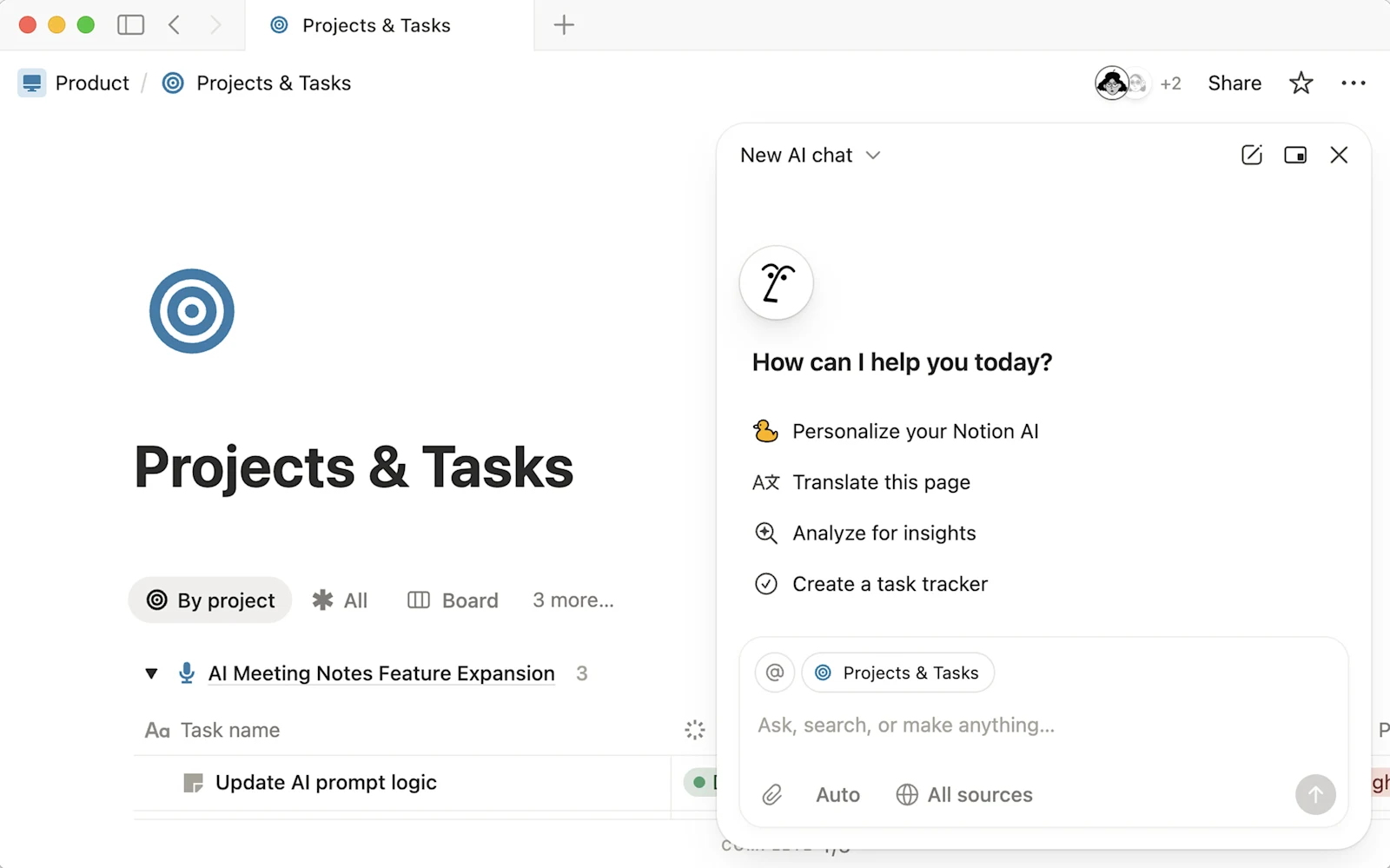
The approval setting sits at the top of each chat, and you can switch it mid-chat. Reading never needs approval. The setting decides what happens when the agent is about to change something or act outside Notion.
| Mode | What the agent does | Use it for |
|---|---|---|
| Always ask | Asks before every change or connected-app action | New or sensitive work where you want to see each step |
| Review for me (default) | Works on its own and pauses when its safety check flags an action | Everyday work |
| Skip all approvals | Runs every action without asking | Repeat jobs you already trust, on content only you use |
Notion’s examples of what may trigger a pause include deleting pages, bulk deletions, sending an email or Slack message for you, viewing files that may hold credentials, and installing dependencies or running build scripts on the computer. Notion also says the review “won’t always flag the same things you would.” Treat it as a seatbelt, not a reviewer.
How to use your ChatGPT plan inside Notion
Notion built this with OpenAI. If you have ChatGPT Plus, Pro or Go, Notion Agent can bill your sessions to that plan instead of your Notion credits.
Before you start, check that your workspace is on Business or Enterprise, that you are a member and not a guest, and that you are using your personal Notion Agent. It does not work with Custom Agents.
- Go to Settings → Notion AI → Usage.
- Under Connected subscriptions, select Connect next to ChatGPT. You can also open the model picker and choose Connect ChatGPT plan.
- Sign in to ChatGPT, allow the connection, and return to Notion.
- Pick a specific GPT model for the session. The model picker shows which plan is in use before you send.
The catch is the model choice. Auto uses your Notion Standard credits, and a non-GPT model uses your Select credits, even when ChatGPT is connected. If your ChatGPT usage runs out, the agent asks to switch to Notion credits. Notion says these conversations do not appear in your ChatGPT history or memory, and its own AI subprocessor agreements still apply.
What Notion Agents cost under the new credits
Business and Enterprise seats now include two monthly allowances:
| Credit type | Included per seat each month | Used for |
|---|---|---|
| Standard | 1,500 | Work where Notion picks the model (Auto) |
| Select | 500 | Work where you pick the model, and running your Custom Agents |
Admins can buy additional credits for the workspace. The new system is live for new customers, and existing customers move over on November 2, 2026.
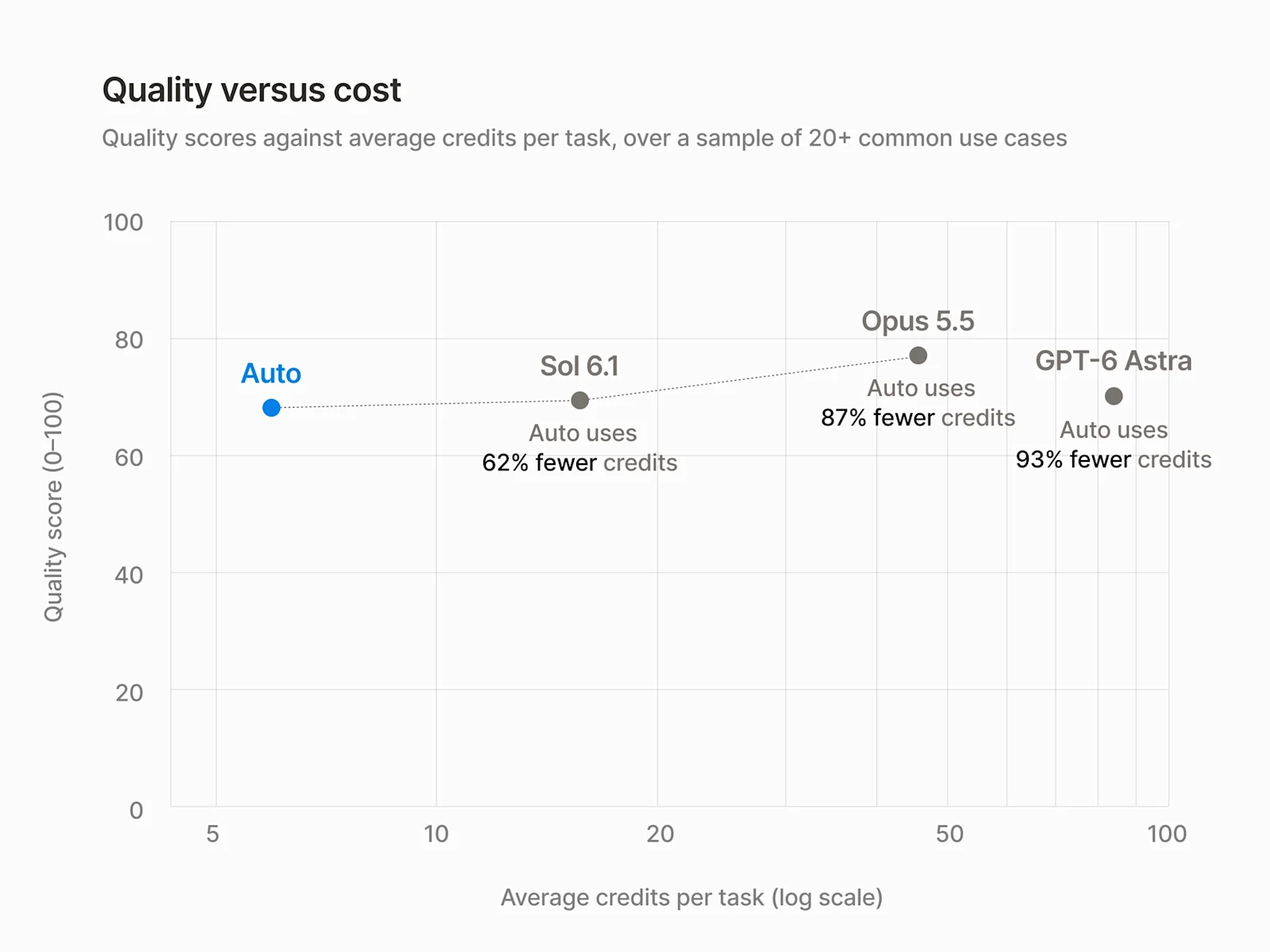
The split makes Auto the economical default. Notion says that across 20+ common tasks, Auto delivered results similar to Opus 5.5 and Astra at about 90% lower average cost. That is Notion’s own benchmark, so check it against your workload before you rely on it.
Limits and risks Notion lists
- Open-web risk. Notion names three risks of browsing: prompt injection from a site or code the agent opens, data from your chat sent to an outside service, and untrusted code behaving unexpectedly. It says they “can’t be eliminated completely.”
- Your permissions, not more. Notion Agent has the same access you do. That protects private pages, and it also means the agent can change anything you can.
- ChatGPT plan scope. GPT models only, personal Notion Agent only.
- MCP connections. Connecting MCP servers to Notion Agent needs Business or Enterprise, works on web and desktop but not mobile yet, and your admin may limit which servers you can add.
- Not shipped yet. AI Command Center, with usage by person and agent, spending limits and model controls, is coming soon. Skills via Notion MCP is also coming soon. Memory sync is live.
Where Notion Agents fit when your team uses more than one agent
Notion Agent’s real advantage is location. It works where your pages and databases already are, and it files results as pages and tables your team already reads. If your knowledge lives in Notion, that beats copying context into another chat.
Notion is also opening that knowledge to other agents. Notion says the overhauled Notion MCP connects agents like ChatGPT, Claude, Grok Bot and Muse to Notion as a shared brain where they find context and take actions, and memory sync lets them store what they learn in Notion.
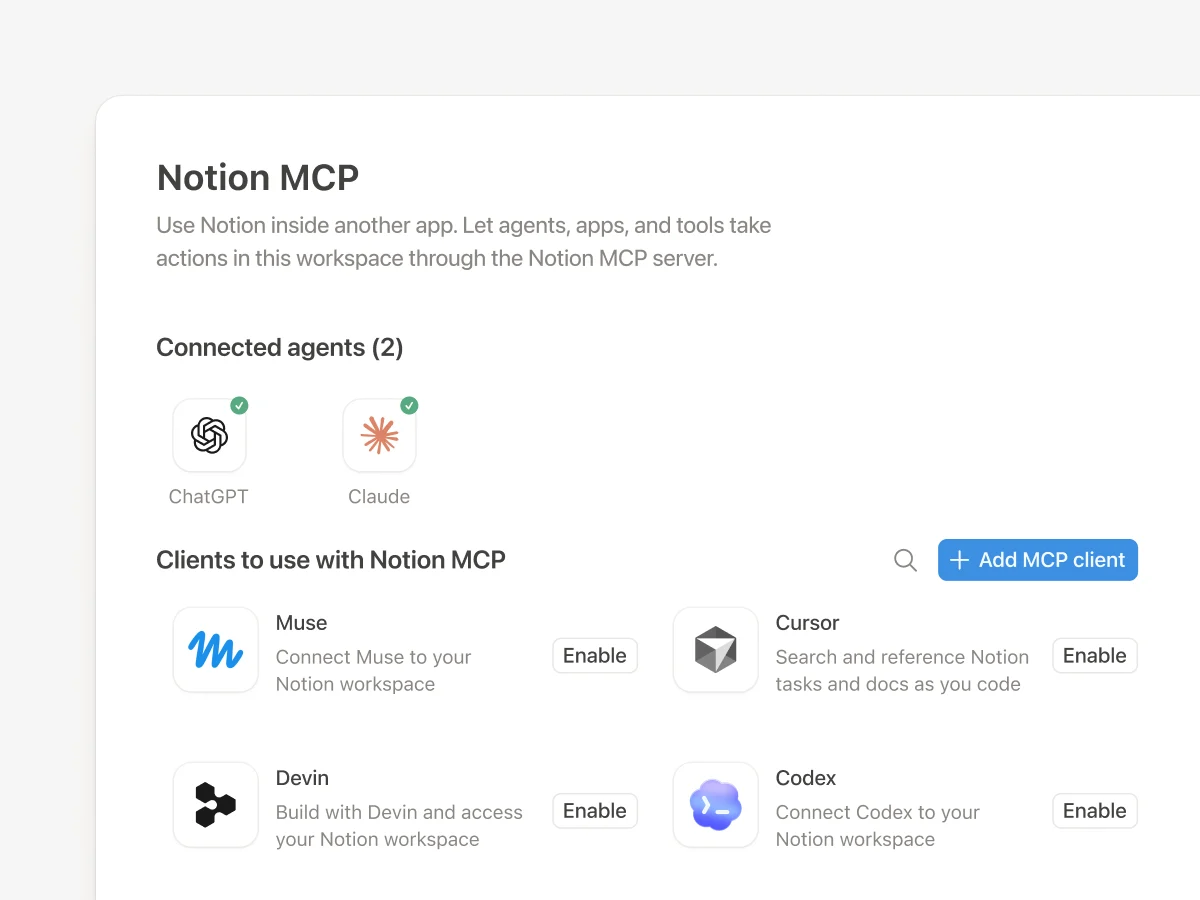
The boundary is the output format. A Notion page is a good home for research, notes and plans. It is not where a team builds an HTML prototype, a landing page or a deck, and it is not a neutral place where agents from different vendors edit the same artifact and publish it.
That is where AgentGrid.io, built by Anima, fits. Here is a workflow that uses each tool for what it does well:
- Research in Notion. Ask Notion Agent, with browsing on, to visit ten competitor pricing pages and build a comparison table in Notion. This is the kind of multi-site gathering Notion documents.
- Build the artifact with Claude. In Claude, with both the Notion connector and the AgentGrid.io connector installed, ask it to read the table and build a one-page HTML pricing comparison on AgentGrid.io.
- Refine with other agents. Ask ChatGPT, through the AgentGrid.io plug-in, to tighten the copy in the same artifact, or have Grok Bot check the layout. Each change appears in version history under that agent’s name.
- Review and publish. Your team comments on specific sections, the agents revise, and a person clicks Publish when it is approved.
I have not tested Notion Agent writing to AgentGrid.io directly, so this workflow routes through agents that connect to both. The shared artifact is the hand-off. No agent sees another agent’s private chat.
If you are comparing workspaces for this, our ChatGPT Space guide covers the same question from OpenAI’s side, and sharing context between Claude and ChatGPT shows the cross-agent pattern in more detail.
Try AgentGrid.io to give Notion research, Claude, ChatGPT and Grok Bot one artifact to work on.
Use each tool when
- Use Notion Agent when the task starts from your Notion workspace and the result should end up as a Notion page or database.
- Turn on web browsing when the job needs sites with no Notion connection, and keep approvals on Always ask until you trust the task.
- Connect your ChatGPT plan if you already pay for it and are happy to pick GPT models for those sessions.
- Use AgentGrid.io when the output is an HTML page, prototype or document that several agents and people need to edit, review and publish.
Frequently asked questions
What can Notion Agents do now?
Since October 19, 2026, Notion Agent has its own computer for running code and working with files, an optional web browser for clicking through sites, filling forms and downloading files, smarter context management, and a default Review for me approval mode.
How long can a Notion Agent run?
Notion's release notes say Notion Agents can work on a single task for up to 24 hours. Before the rebuild, the limit was five minutes.
Can I use my ChatGPT subscription in Notion?
Yes, with ChatGPT Plus, Pro or Go on a Notion Business or Enterprise workspace. Connect it under Settings, Notion AI, Usage. It only applies to your personal Notion Agent when you pick a specific GPT model, not to Auto or Custom Agents.
Is Notion Agent web browsing safe?
Notion lists prompt injection, data exposure and untrusted code as risks and says they cannot be eliminated completely. Keep approvals on Always ask for sensitive work, watch the live browser view, and remember the agent has your permissions.
When do existing Notion workspaces switch to the new credits?
The new credit system is live for new customers. Existing customers move over on November 2, 2026, with 1,500 Standard and 500 Select credits per Business or Enterprise seat each month.
Frequently asked questions
Since October 19, 2026, Notion Agent has its own computer for running code and working with files, an optional web browser for clicking through sites, filling forms and downloading files, smarter context management, and a default Review for me approval mode.
Notion's release notes say Notion Agents can work on a single task for up to 24 hours. Before the rebuild, the limit was five minutes.
Yes, with ChatGPT Plus, Pro or Go on a Notion Business or Enterprise workspace. Connect it under Settings, Notion AI, Usage. It only applies to your personal Notion Agent when you pick a specific GPT model, not to Auto or Custom Agents.
Notion lists prompt injection, data exposure and untrusted code as risks and says they cannot be eliminated completely. Keep approvals on Always ask for sensitive work, watch the live browser view, and remember the agent has your permissions.
The new credit system is live for new customers. Existing customers move over on November 2, 2026, with 1,500 Standard and 500 Select credits per Business or Enterprise seat each month.